

Field Service Management Software: How AI Fixes the QuickBooks Gap
If your HVAC team runs operations in ServiceTrade but keeps cleaning up invoices in QuickBooks, the integration is not the whole problem. The problem is the messy handoff between field work and accounting.
Summary
ServiceTrade has a QuickBooks integration, including support for QuickBooks Desktop and QuickBooks Online. That matters. HVAC businesses should not have to retype every customer, job, and invoice by hand.
But "integrated" does not always mean "done." In one customer discussion, the business was doing substantial monthly revenue with thin margins, while dozens of ServiceTrade users were supporting a steady weekly job volume. The gap between field service management software and QuickBooks was not an annoyance. It was a margin problem.
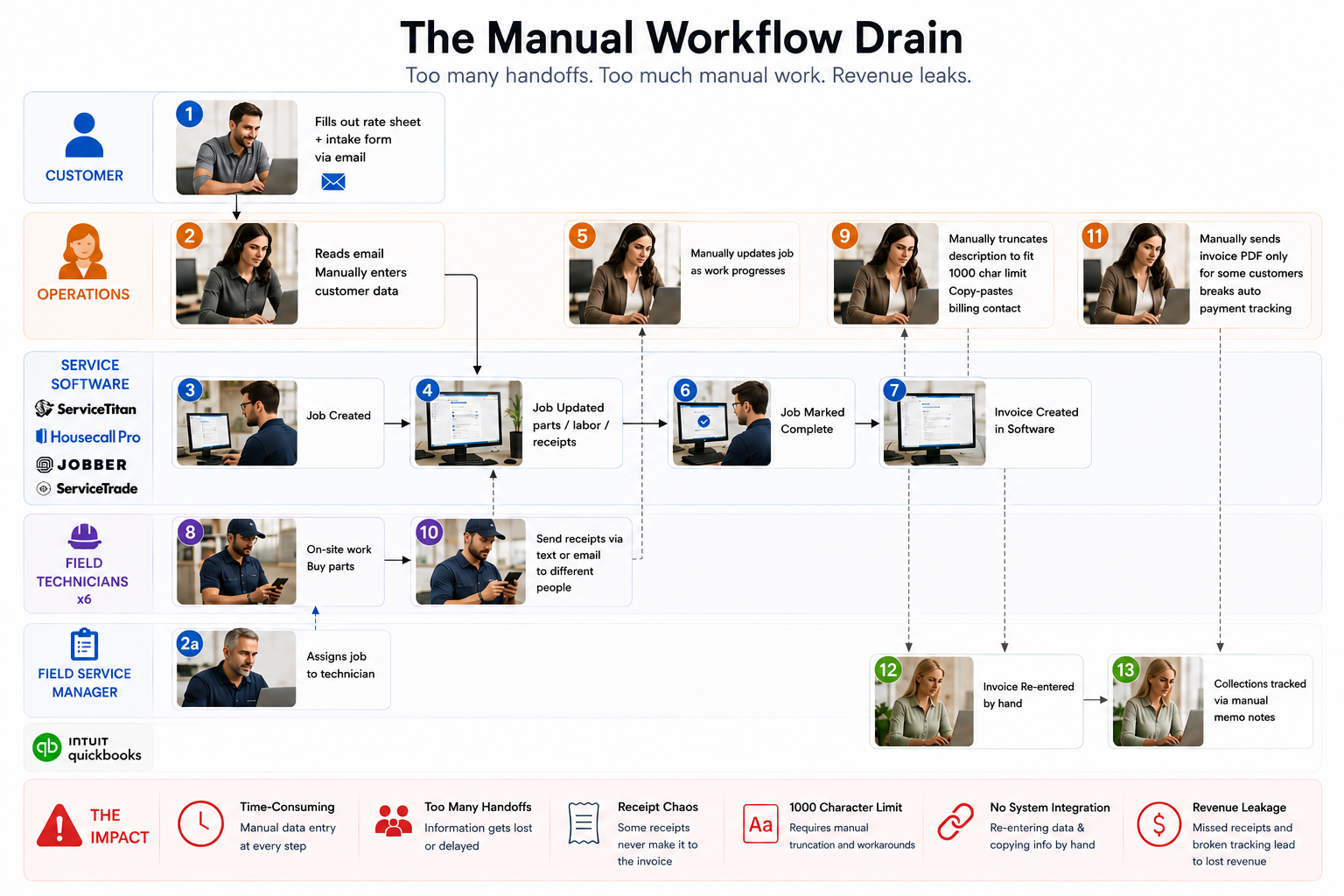
1. Manual data entry at every step
The customer-to-invoice workflow started manually. Customers sent rate sheets and intake forms by email. An admin re-entered that information into ServiceTrade, created the job, built the invoice, and added line items from receipts by hand. Multiple people had to touch a single invoice before it was ready to send.
The hidden second shift
Email intake
Rate sheets and customer intake forms arrive in the inbox.
ServiceTrade rebuild
An admin re-enters the data, creates the job, and builds the invoice.
Receipt line items
Receipts are collected from different people and added by hand.
2. Data does not flow cleanly into QuickBooks
According to ServiceTrade, its accounting integration supports QuickBooks Desktop and QuickBooks Online and can automatically sync customers, jobs, and invoices. That removes a lot of duplicate entry on the happy path.
The painful part was everything that did not transfer cleanly. Billing contact information had to be copy-pasted from ServiceTrade into QuickBooks. QuickBooks enforced a 1,000 character limit on description fields, so long job descriptions had to be manually edited and truncated before they could sync. Contact information sometimes ended up stuffed into the job description as a workaround, just to keep it accessible.
3. Revenue leakage from missing receipts
Six field technicians were buying parts across the Bay Area. Receipts came in through text messages and emails to different people. Some purchases never made it onto invoices, which meant the business ate the cost.
What falls through the cracks
- Receipts are sent by text to one person and email to another.
- Purchases are not reliably matched to a job number.
- Parts bought in the field can miss the final invoice.
- Missing receipts quietly become lost margin.
4. Collections are a manual nightmare
Getting paid required its own manual tracking system. Overdue accounts were tracked with notes in the QuickBooks memo field. There were no automated reminders, so someone had to check and follow up manually. Some customers required PDF-only invoice delivery, which broke automatic payment tracking entirely.
5. Why legacy field service software is not enough
Legacy field service software is good at organizing the work. ServiceTitan, Housecall Pro, ServiceTrade, and similar systems can help teams schedule jobs, dispatch technicians, capture work orders, and create invoices. The problem is what happens after the operational record has to become a clean accounting record.
That workflow was not clean. The office team was interpreting emailed intake forms, summarizing messy job descriptions, matching receipts to job numbers, deciding what belonged on invoices, and manually tracking collections exceptions.
6. What an AI agent should do
An AI agent should not replace ServiceTitan, Housecall Pro, ServiceTrade, or QuickBooks. It should sit between field service management software and accounting, then do the reasoning work that legacy workflows do not handle well.
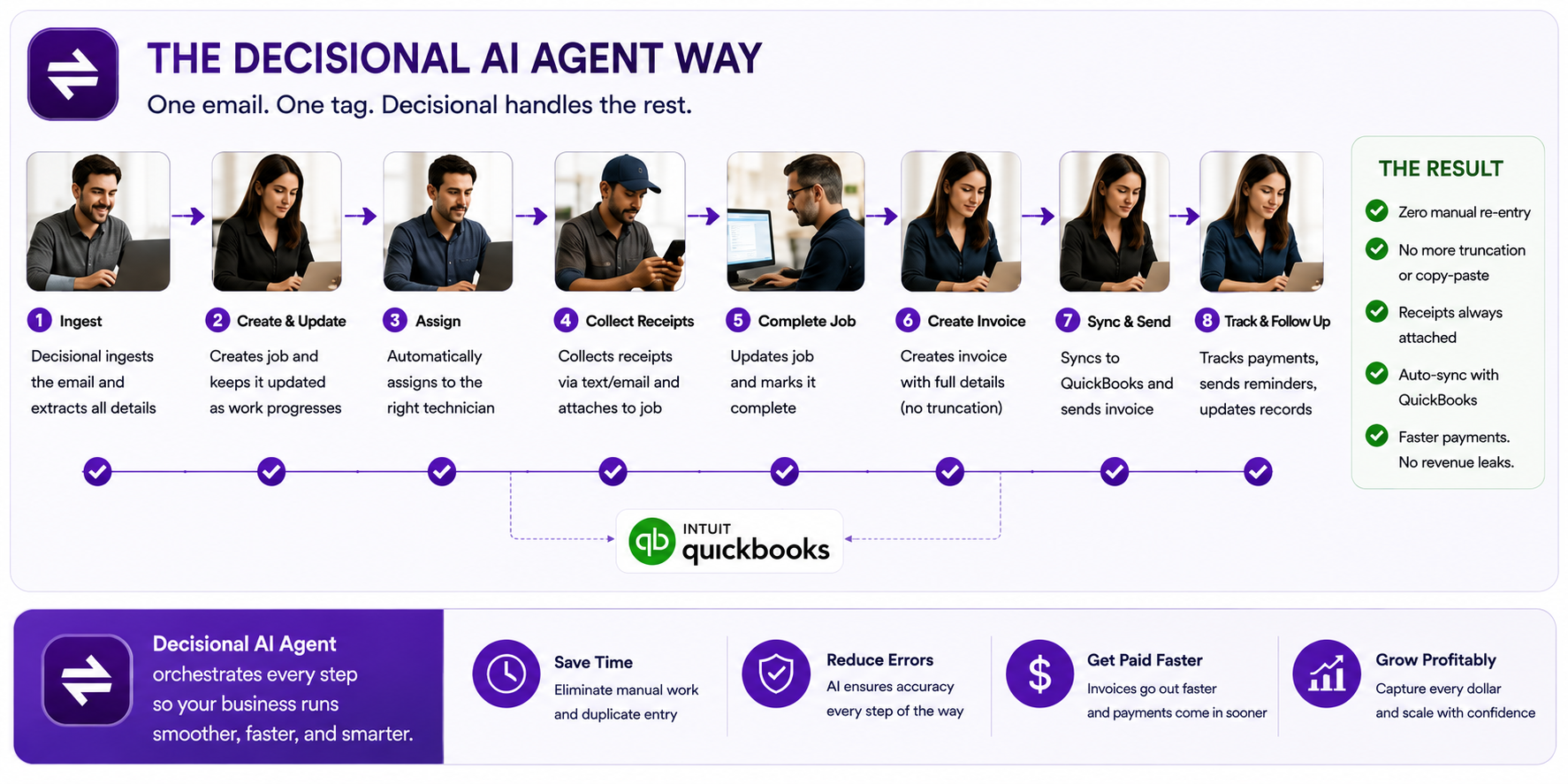
A better workflow
- Auto-create ServiceTrade jobs from emailed intake forms.
- Transfer billing contacts into QuickBooks with the right tags.
- Summarize job descriptions under QuickBooks' 1,000 character limit.
- Process receipts from email and text, then match them to job numbers.
- Track overdue accounts and draft collections reminders.
The operator still approves the important decisions, but they are reviewing work instead of rebuilding it. That is the difference between integration and actual automation.
7. Bottom line
If your HVAC business is still copying data from ServiceTrade into QuickBooks, the issue is probably not that you need a new accounting system. You need a better layer for the messy handoff between operations and accounting.
Native integration moves the clean data. Agentic automation handles the exceptions.